
Documentation / Loupa
Reports
What each block of Loupa → Reports shows: alert signals, MRR and churn, cohorts, recovered payments, cash against MRR and the risk list. Everything comes from the MemberPress tables.
Where the numbers come from
Loupa calculates the metrics month by month and stores them in its own table. Every night at 04:30 it recalculates the last three months.
If something older changes in MemberPress, such as a refund or a deleted transaction, recalculate from that month in Loupa → Settings → Subscription metrics. If Reports say there are no metrics yet, see Install Loupa.
Months are in UTC, like MemberPress → Reports, so cash matches to the cent. Amounts use the currency set in MemberPress.
Period, membership, CSV and printing
- Period: “Last 12 months” (the current one included), “Calendar year” or “Range of months”. Changes on the cards compare with the previous period of the same length.
- Membership: limits everything to one membership. Cohorts always cover all memberships, because the sign-up belongs to the customer, not to the plan.
- CSV on each block downloads its data. The risk list holds emails: treat it as personal data.
- Print / save as PDF gives a clean page without menus or buttons.
Every card and chart has a “What does it measure?” drop-down. It gives the definition, the calculation, what is good or bad and what to do if it goes wrong.
Alert signals
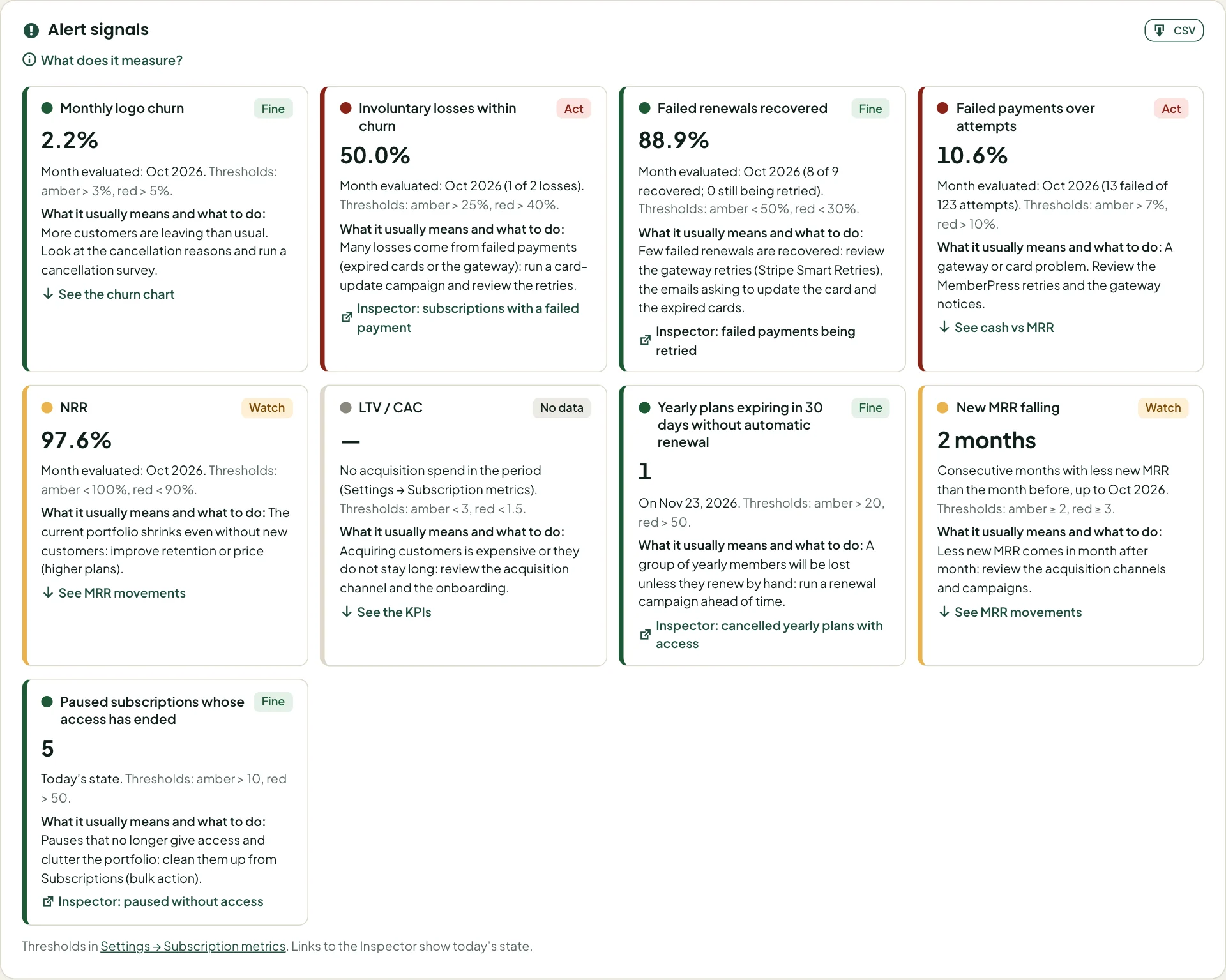
Each signal is a traffic light: “Fine”, “Watch”, “Act” or “No data”. Each one links to the chart or to the Inspector list with the people affected. Default thresholds, amber then red:
- Monthly logo churn: above 3 % and 5 %.
- Involuntary losses within churn: above 25 % and 40 %.
- Failed renewals recovered: below 50 % and 30 %.
- Failed payments over attempts: above 7 % and 10 %.
- NRR: below 100 % and 90 %.
- LTV / CAC: below 3 and 1.5.
- Yearly plans expiring in 30 days without automatic renewal: more than 20 and 50.
- New MRR falling: 2 and 3 months in a row.
- Paused subscriptions whose access has ended: more than 10 and 50.
Signals use the last closed month of the period, except LTV / CAC (the whole period) and paused subscriptions (today’s state). Change the thresholds in Loupa → Settings → Subscription metrics.
 (opens the full-size capture)
Key figures
- MRR and ARR: monthly recurring revenue, with yearly and six-monthly payments spread over their months, and MRR × 12.
- Active customers with current paid access at the end of the period. A failed renewal recovered within the recovery window, or still being retried, does not interrupt it.
- Logo churn and Revenue churn: share of customers and of MRR lost each month.
- NRR: how much MRR the existing portfolio keeps, without counting sign-ups.
- ARPU, LTV (estimated and empirical) and LTV / CAC.
LTV / CAC only appears when some month of the period has acquisition spend. Enter it in Loupa → Settings → Subscription metrics.
MRR movements and retention cohorts
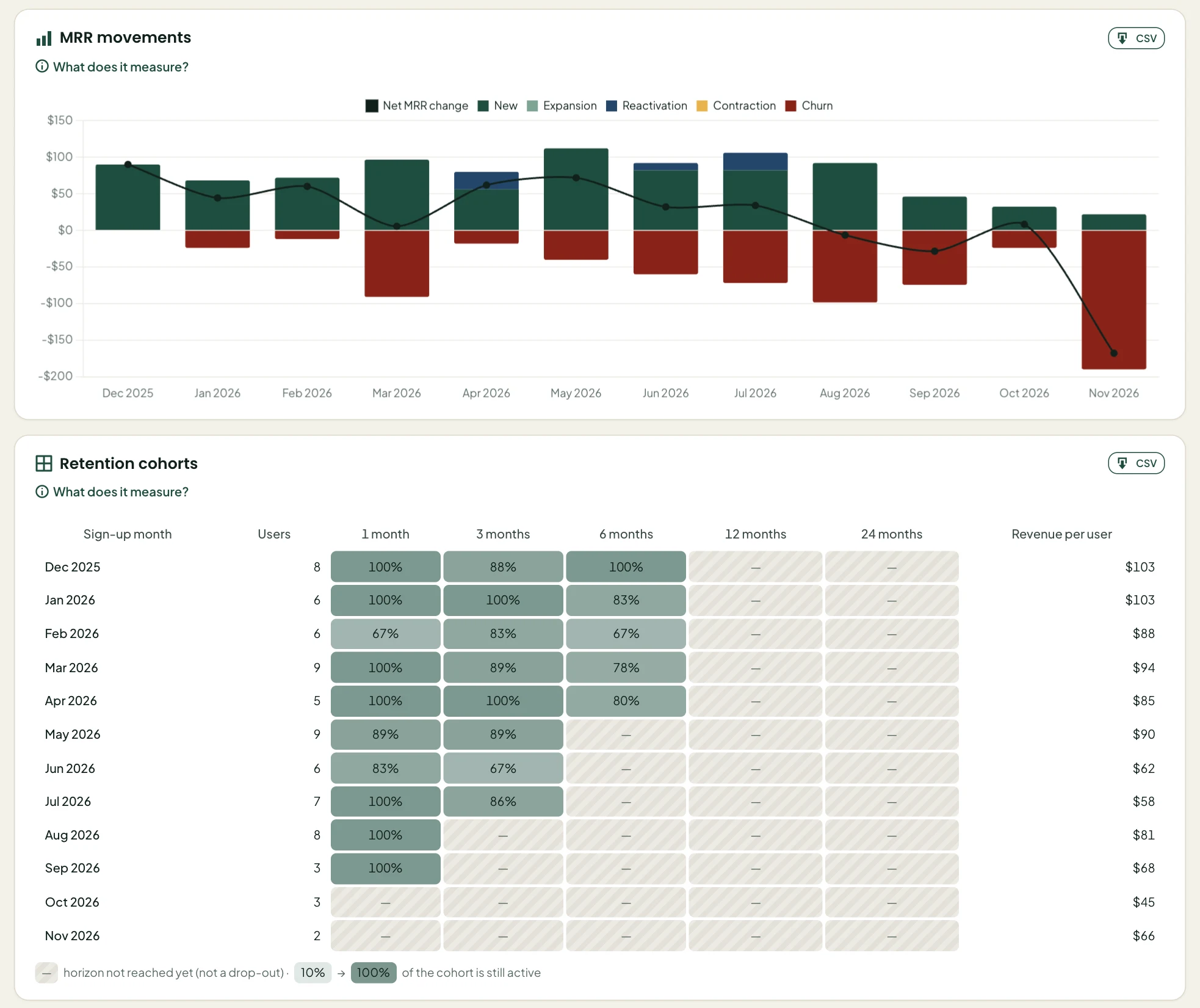
“MRR movements” explains why MRR changes each month: new, expansion and reactivation above zero, contraction and churn below. The line is the net change.
“Retention cohorts” groups customers by sign-up month and shows the share still active after 1, 3, 6, 12 and 24 months. Grey cells are horizons not reached yet, not drop-outs.
 (opens the full-size capture)
Churn by type and MRR by plan
“Voluntary, involuntary and other churn” splits each month’s losses. Voluntary: the customer stopped the subscription. Involuntary: a failed renewal that was not recovered within the recovery window, Stripe included. Other: an expiry without any event or the end of a one-time purchase.
“MRR by membership and by billing cycle” shows where the MRR comes from. Non-recurring revenue, such as lifetime plans and one-time purchases, is shown apart.
Failed renewals: recovered payments and provisional months
A failed renewal that the gateway charges within the recovery window is not a loss. The window is 35 days by default, between 7 and 60, in Loupa → Settings → Failed renewals. While it is retried, the customer counts as active and the Inspector shows “Failed payment · retrying”, so there is neither a false loss nor a false reactivation. If the window ends without a payment, or the gateway cancels or pauses the subscription, it counts as an involuntary loss on the date the access ended.
While a renewal is still being retried, the months whose figures depend on it are provisional: a note above the signals says until when. When it is settled, the nightly recalculation updates them and, if a figure changes, the month is marked as corrected, with the date.
The “Recovered payments” block shows, by month of the first failure, how many renewals failed, how many were recovered or lost, how many are still being retried, the recovery rate, the recovered MRR and the average days to recover.
PayPal Commerce does not record failed renewals in MemberPress, so they do not appear in this block: if its retry is paid, Reports shows a loss and a reactivation.
Cash vs MRR
It compares what was collected each month with the MRR. “Collected” must match the “Collected” column of MemberPress → Reports.
The difference is explained month by month: six-monthly and yearly payments enter cash at once, while MRR spreads them. The table also shows failed payments over attempts.
Risk list
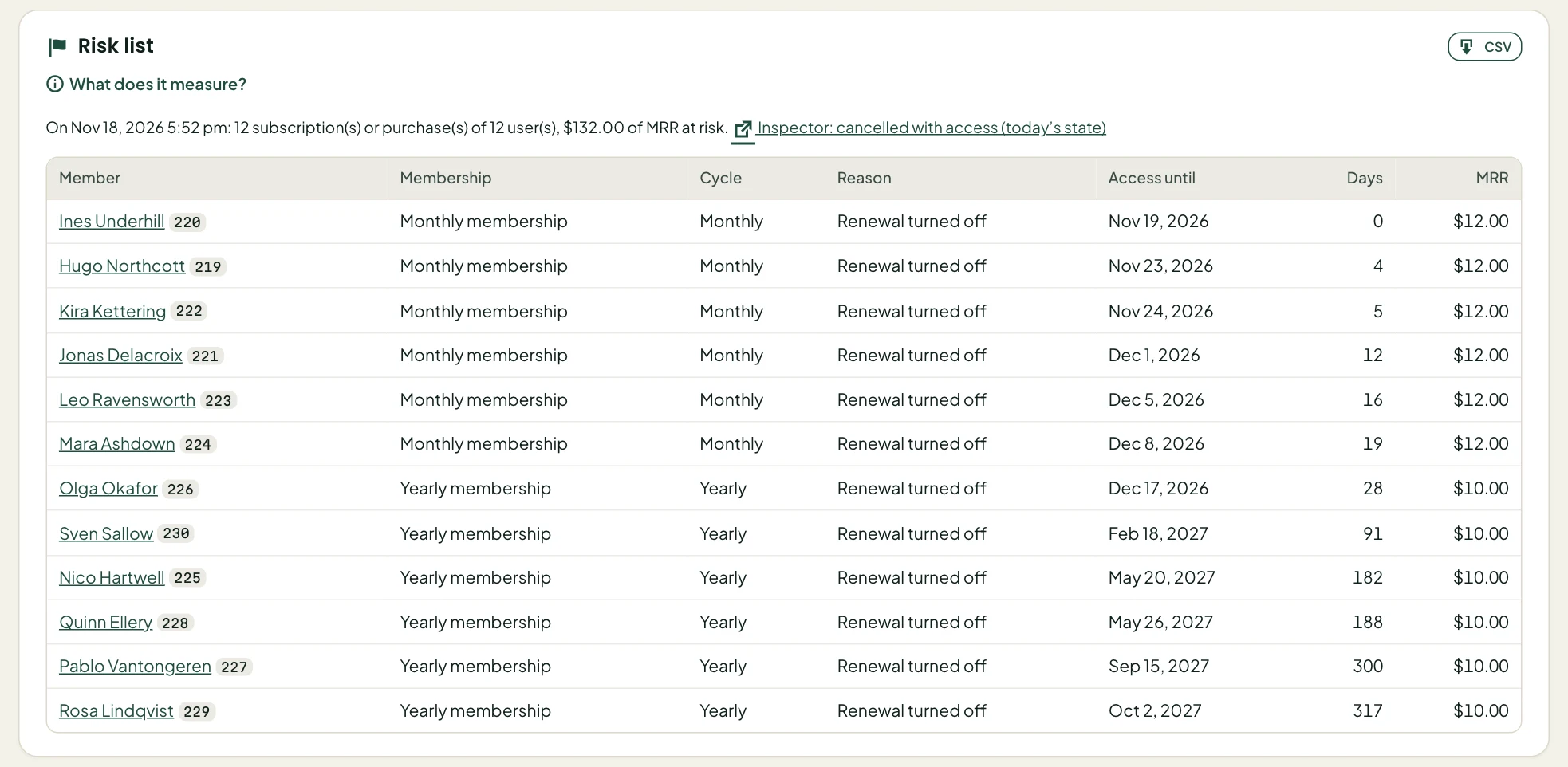
Customers with paid access who may be lost. It lists subscriptions with automatic renewal off and purchases whose access ends in 30 days or less without renewal.
The screen shows the first 50, those that expire first; the CSV has all of them. A link opens the Inspector with today’s state.
 (opens the full-size capture)
Next steps
- Open the members behind a signal: The Inspector and member pages.
- Clean up paused subscriptions without access: Bulk actions.
Something not working as described here? Write to us at hello@getloupa.com or see Support. We answer Monday to Friday, 9:00 to 18:00 (mainland Spain time).