
Documentation / Loupa
The 9 states
How Loupa gives each member one real status, what each of the 9 states means and why Loupa’s numbers differ from MemberPress’s “Active” filter.
Two things MemberPress keeps apart
MemberPress stores two different things that are easy to mix up. The subscription status says whether automatic renewal is active, paused or cancelled. The access says whether a paid transaction has not expired yet.
A subscription can stay “active” for months after the member lost access. It happens when the gateway stopped charging and the webhook never arrived.
Loupa crosses both and gives every member one real status. Access means a completed or confirmed transaction that has not expired, or one with no expiry date.
The 9 states
These are the states of the Inspector list, in the order Loupa shows them. The examples come from the demo site, except the one for “Failed payment · retrying”, which comes from a test case. That state is new in Loupa 1.0.2.
| State in Loupa | What it means | Example |
|---|---|---|
| Active | The member has access right now and MemberPress has an active subscription that will renew automatically. | Monthly membership. The charge of 1 Nov 2026 was declined, the retry on 4 Nov went through, and access runs until 1 Dec. |
| Active until expiry | The member still has access, but the subscription is cancelled, so access ends on its expiry date and will not renew. | Monthly membership since 19 Jun 2025, renewal cancelled. The last charge, on 19 Oct 2026, gives access until 19 Nov. |
| Active (one-time payment) | The member has access from a purchase that does not renew (one-time or lifetime). If they also have a subscription, it is not the one giving access today. | Bought lifetime access for $249 on 2 Sep 2025. The payment has no expiry date and there is no subscription. |
| Failed payment · retrying | The last renewal failed and the gateway is still retrying it, within the recovery window (35 days by default). No access meanwhile; the subscription must not be cancelled. If it is paid, the member is active again; if the window ends without a payment, the status becomes No access · subscription active. | Monthly membership with Stripe. The renewal of 19 Nov 2026 was declined and the retry of 21 Nov too; Stripe keeps retrying and the window runs until 24 Dec. |
| No access · subscription active | MemberPress still shows the subscription as active, but no payment covers today, so the member has no access and the subscription needs closing by hand. | Monthly membership. Charges declined on 15, 19 and 23 Jun 2026. Access ended on 15 Jun, and MemberPress still lists the subscription as active. |
| Paused | The subscription is paused, by hand or after failed payments. The member may keep access until the paid period ends, and nothing renews until it is resumed. | Monthly membership, paused. The last charge, on 10 Nov 2026, gives access until 10 Dec, and it will not renew until it is resumed. |
| Pending | The member signed up but the first payment has not been confirmed, so there is no access yet. | Signed up for the monthly membership on 2 Nov 2026. No payment has been recorded since. |
| Cancelled | The subscription was cancelled and the paid period is over, so the member has no access. | Paid the monthly membership from 4 Jan to 4 Jul 2026 and then cancelled. Access ended on 4 Aug. |
| Expired | The member paid at some point, but no payment covers today and there is no subscription left: a natural ending. | Bought the one-year pass for $99 on 8 Mar 2025. It ended on 8 Mar 2026 and was not bought again. |
The state that needs attention
“No access · subscription active” means MemberPress thinks the subscription renews, but no payment covers today. It is usually a Stripe or PayPal subscription whose charge failed without the notice reaching the site.
The member has no access and needs review and manual closing. On the member page, a red warning says since when and recommends cancelling the subscription in MemberPress and checking it in the gateway.
Do not mix it up with “Failed payment · retrying”. There the last renewal failed, but the gateway is still retrying it within the recovery window: 35 days by default, between 7 and 60, in Loupa’s settings. There is no access either, but the subscription must not be cancelled: many of these payments are recovered. If it is paid, the member is back to “Active”; if the window ends without a payment, the status becomes “No access · subscription active”.
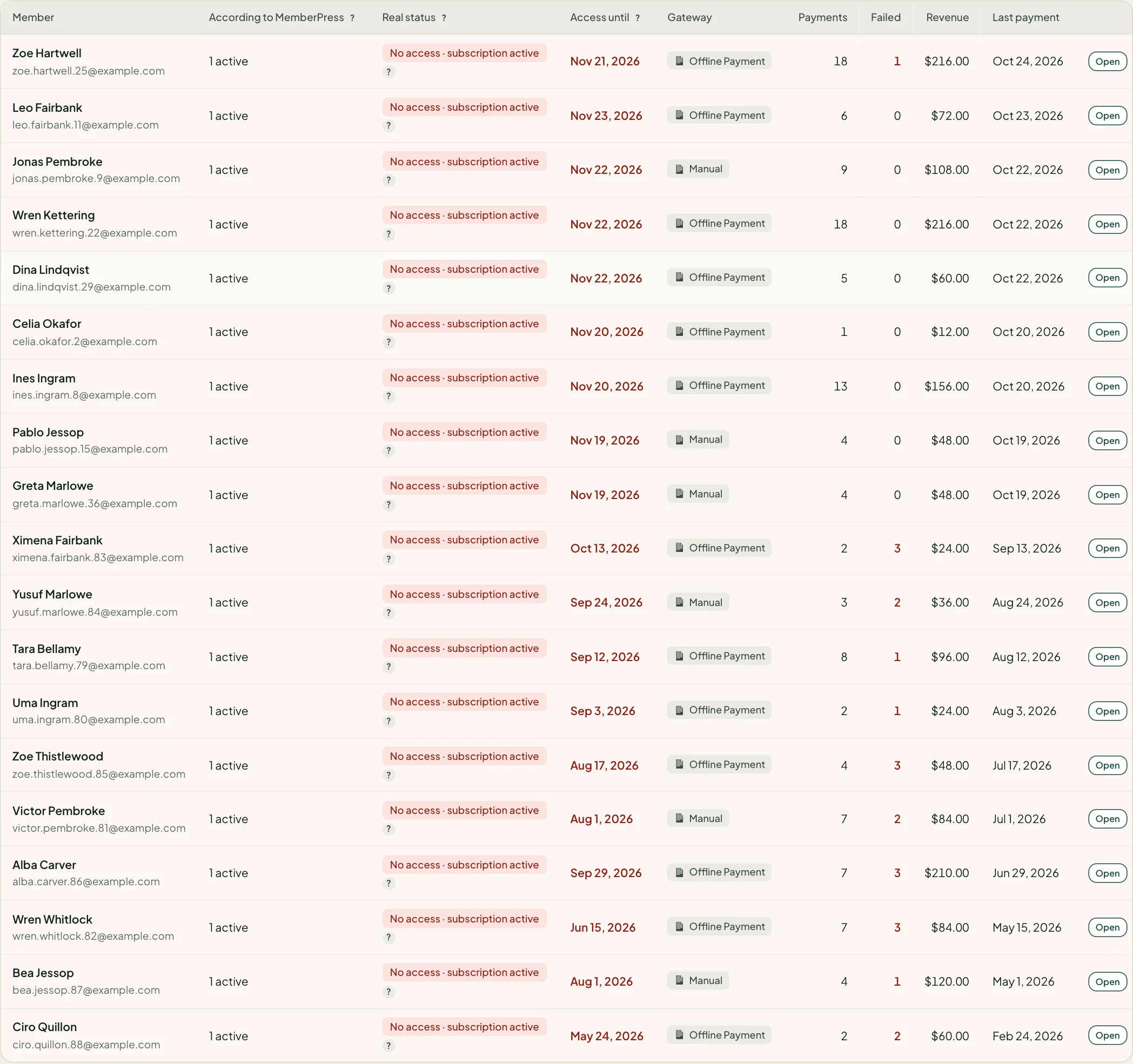 (opens the full-size capture)
Why MemberPress and Loupa show different numbers
MemberPress’s “Active” filter counts subscriptions whose automatic renewal is on, not members with current access. Loupa decides from the transactions, which is what MemberPress itself uses to grant access.
The difference is usually the “No access · subscription active” members. That is why the Inspector shows the real status next to what MemberPress says.
Two states you only see on a member page
- Deleted: the WordPress user no longer exists.
- No subscription: a user without any MemberPress data.
Neither appears in the Inspector list, which only shows members with MemberPress activity.
Next steps
- Filter the list by state and open each member: The Inspector and member pages.
- Close stale subscriptions many at a time: Bulk actions.
Something not working as described here? Write to us at hello@getloupa.com or see Support. We answer Monday to Friday, 9:00 to 18:00 (mainland Spain time).